

An ecommerce product page can look complete while leaving the purchase uncertain: which option is selected, what arrives with it, whether it suits the intended use and what happens after the order. A longer description alone does not resolve those gaps
Use this ecommerce product page content checklist to review a real item and its selected option before commissioning more copy or sending more traffic. The task is to make the offer understandable and consistent, then separate missing information from a broken ordering function
Main image: Concept illustration with a fictional lamp and digital product page, not a client project, actual product specification or platform interface
Start with the item the customer will actually receive
Give the product a recognisable name and explain its intended use with facts the seller can verify. A description such as “premium quality for every need” cannot replace the model, relevant materials, dimensions, compatibility or care information that changes the buying decision
Shopify’s product-description guidance identifies specifications, suggested uses and supported benefits as useful information. Apply that selectively: a replacement component needs different detail from a home accessory. Include what helps someone assess the actual product, rather than filling every page with the same headings
Keep a source for consequential claims. Confirm compatibility against the manufacturer’s information for the exact model; do not infer it from a similar connector or photograph. If suitability depends on conditions the page cannot establish, explain what must be checked and how the customer can ask before ordering
State what is included and what is sold separately. A styled photograph containing a cable, stand or decorative accessory does not establish that it arrives with the order. Product data and copy should answer that question explicitly
Make the selected option unambiguous
When a product has options, use clear labels and show which combination the customer has selected. Distinguish colour or finish from a different model, capacity or bundle when those choices change what is supplied. Do not rely on a colour swatch alone to explain a meaningful difference
Check that the selected option agrees with the relevant image, current approved price, availability and item added to the basket. An unavailable choice needs a clear state; a successful button press should not silently substitute another option
For products submitted to Google Merchant Center, its landing-page requirements connect the destination to the same product or variant as the submitted data. Review the actual linked option and the information shown on arrival. A generic category page or a different default option is not an adequate substitute for the advertised item
Give each image a buying question to answer
Plan the gallery around useful evidence: the selected item, relevant detail, scale or fit where it can be shown accurately, and the parts supplied together. Additional images should explain something the first view cannot, rather than repeat the same angle
Keep text explanations alongside the images. A close-up can show a connection, but its appearance alone does not prove compatibility. A lifestyle scene can show intended use, but it must not imply that every surrounding object is included
For Merchant Center submissions, Google’s main product-image guidance calls for the correct item and variant, without added promotional overlays. Keep a clean product image separate from instructional artwork. The conceptual illustrations in this article explain page planning; they are not evidence of a real product or ready-to-submit product photography
Explain delivery and returns using the store’s actual terms
A product page should make relevant delivery restrictions, fulfilment conditions and return information easy to find before the customer commits. State how location-dependent costs or timing are established, rather than publishing an attractive delivery promise the operation cannot support
Link a concise explanation to the full applicable policy and check that the two agree. Distinguish dispatch from arrival, and clarify relevant product-specific conditions. Do not copy a competitor’s return period, warranty wording or delivery coverage into your own offer
Shopify’s policy guidance stresses reviewing policies against actual business practices and checking their translations. Use the same discipline on any platform. Policy wording and applicable obligations need their own approval; a page-content checklist does not establish legal compliance
Keep the page, basket and product data aligned
Choose a real product option and follow it from its incoming link to the page and basket. Confirm that the identity, selected option, quantity, displayed currency and applicable charges remain understandable. Check the approved information in the store’s product records as well as the words visible on the page
If you use product structured data, the technical owner should verify that it represents the actual page and product. Google’s product-variant documentation addresses how related options are represented and reached directly. Its implementation requirements depend on the site’s variant structure; do not apply a blanket URL or canonical change to every store
Google’s structured-data guidelines require relevant, visible and truthful information, and make clear that valid markup does not guarantee a rich result. Do not invent ratings, stock, product identifiers or offer details to complete a plugin field. Structured data cannot supply a missing answer to a customer
A hypothetical desk-lamp page: resolve the facts before the layout
Imagine a fictional retailer preparing a desk-lamp page with selectable finishes. The initial product notes mention a power accessory without confirming whether it is supplied. This is a content-planning example, not a real product, ADAMS client project or technical specification
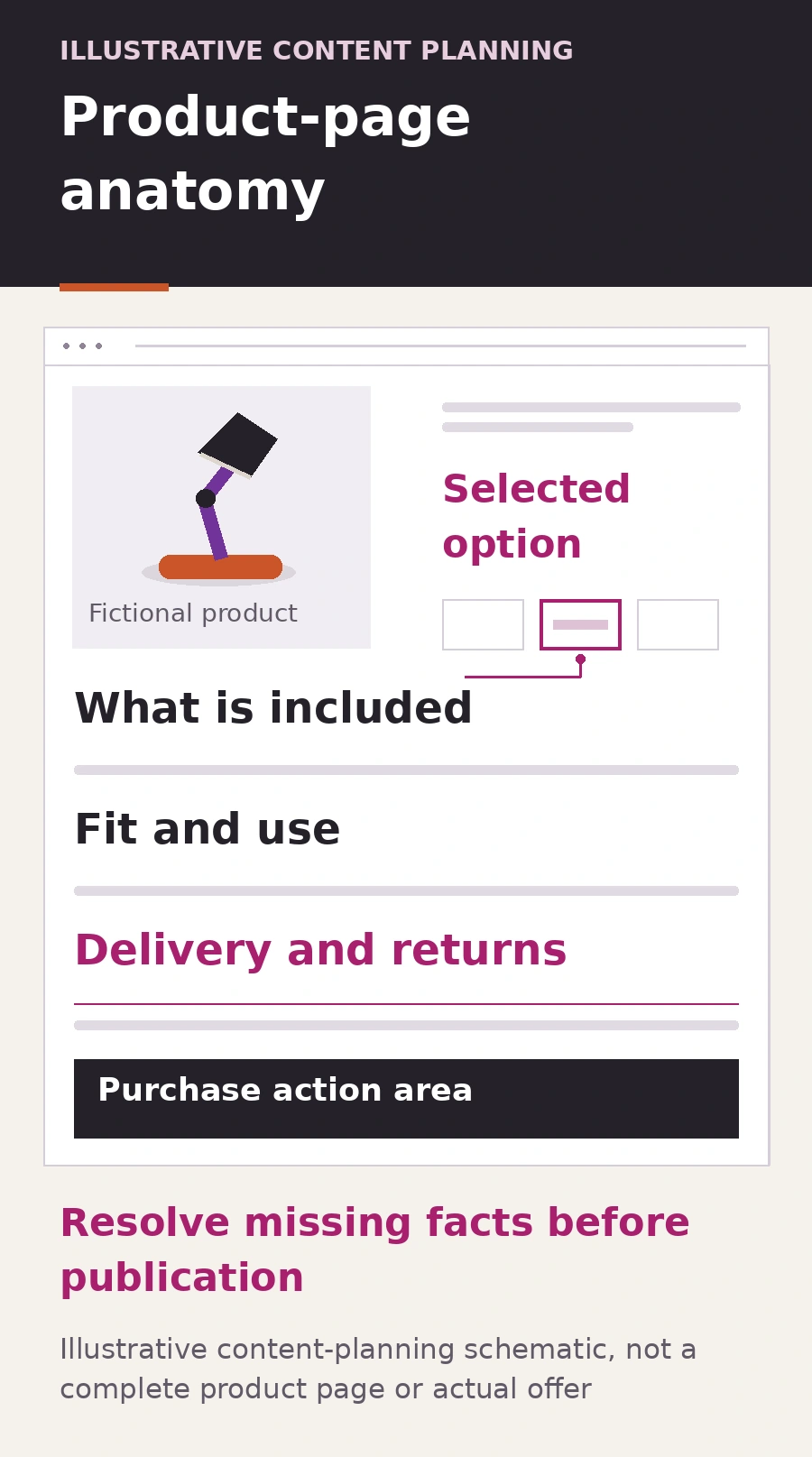
The first action is to ask the product owner to confirm the selected item, included parts and supported connection and use. Do not invent an adapter, power rating or compatibility claim to make the description feel complete. Once approved, show the selected option clearly, place the verified inclusion and suitability information near the relevant choice, and provide a route to delivery and return terms
The schematic illustrates where those answers could appear; it is not a complete sales page or a final design prescription. A real page also needs its accurate commercial information and a working ordering process. A planning placeholder is something to resolve before publishing the offer, not wording to leave for a customer to interpret
Review the purchase task on a phone, then assign the right fix
Open the incoming product link on a phone. Can someone identify the selected item, read its important limitations, change an option, understand availability, inspect the relevant image and reach the delivery and return information? Check labels, keyboard access and whether sticky elements obscure controls or explanations
Then test the selected option through the basket and the agreed checkout test process. Keep tests controlled so they do not create unintended orders or payments. Separate a missing answer from a selection-control fault, a basket mismatch or a checkout failure; each needs a different owner
- Missing or unsupported product facts: the product owner confirms the evidence before the writer updates the page
- Accurate facts that are hard to find: the content and design team improve wording and placement
- A choice or order that behaves incorrectly: the store’s technical team reproduces and fixes the fault
Record the affected product and option, the observed issue, its evidence, the approved change and the person checking it afterwards. Use a clear working brief when the review involves several people. Revisit the page when the supplied item, stock arrangements or policies change
This review can identify useful work; it does not prove why every visitor leaves or guarantee more sales. Start with an important page where the business can confirm the facts, complete a focused improvement and check the same purchase task again
ADAMS can help organise approved product information through content marketing and website design. Share the product page and the questions it needs to answer, so content, design and technical work can be scoped clearly. Product variations, custom checkout and integrations need an agreed scope; do not assume they are included in a simple-product website package